
Heartland RV
  • Home
  • All Models

    • Explore All Brands
    • Hershey RV Show
    • RV Finder
  • About Us

    • Contact Us
    • Find My RV Finder: Help Me
    • The Heartland Difference
  • Shop Inventory

Heartland RV

Discover the Best Recreational Vehicles at Heartland RV

Explore

  • All Models
  • About Us
  • Shop Inventory

Heartland RV

Discover the Best Recreational Vehicles at Heartland RV

Explore
  • All Models
  • About Us
  • Shop Inventory

© 2026 Heartland RV. All rights reserved.

  • Terms of Service|
  • Cookie Policy|
  • Privacy Policy
Product Review: WiFi Ranger Elite AC Kit - Heartland RV
Blog›Model reviews

Product Review: WiFi Ranger Elite AC Kit - Heartland RV

Product Review: WiFi Ranger Elite AC Kit

3 min readUpdated Oct 9, 2026
LMLesley Melvin

Share this review

Product Review: WiFi Ranger Elite AC Kit

July 13, 2018

One would expect to have strong WiFi signal and speed when camping at an RV resort. They are certainly fancy when compared to our boondocking locations! However, we’ve been disappointed time and time again with lack of WiFi signal in resorts that claim to have strong WiFi.

Enter WiFi Ranger!! They offer four different packages to suit whatever connectivity needs you may have. Prices range from the entry level Micro LTE Pack at $299.00 to the High End EliteAC Pack FM at $749.99.
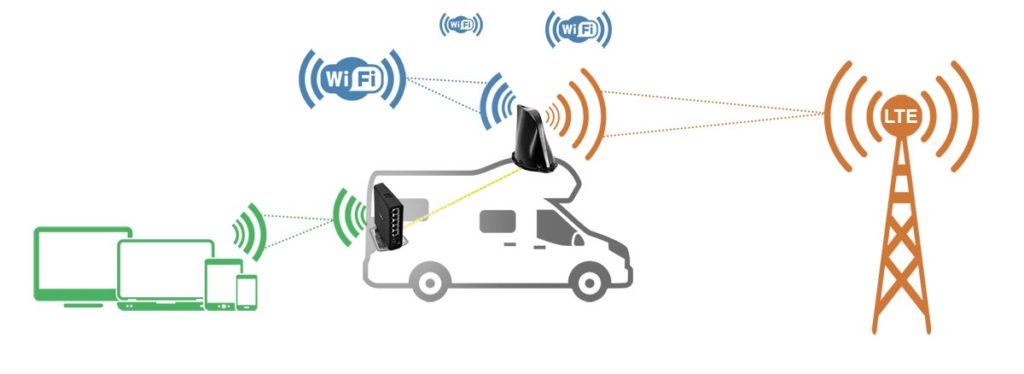
I installed the High End EliteAC Pack FM. To test and compare I started by standing in my driveway to find how many WiFi networks I would find on my phone. I found 7. I then went inside the RV and tested with just my computer and it found 30 WiFi networks…in the same spot.

Finally, I turned on our WiFiRanger EliteAC Pack FM, and it found 43 WiFi networks!  You can see in the image below, how the WiFiRanger found 43 WiFi networks and the signal went from 1 bar of coverage to 5 bars of coverage. Now that is exactly what I was hoping for. When staying at a campground that could be the difference between being able to watch Netflix or not.

To enable “Load Balancing”, which allows you to use WiFi and a second device to increase your coverage. We use our dedicated AT&T hotspot, but you can also use our cell phone as your secondary device. Additionally, the dashboard will show both the WiFi network and the Cellular Hotspot are connected, enabling us to increase and load balance our internet needs. I explain this in more depth in the video below.

*A version of this article was originally published on www.rvwiththetanners.com. It is published here with permission. All opinions expressed are solely those of the author.*
Explore Our Journal

Product Review: HooToo TripMate Titan Portable Router and Media Server

By:  Jim & Melinda Tanner Wouldn’t it be nice to have something that can take all the headaches out of getting...
Read More
The side of an RV with an extended awning parked near the beach.

Product Review: Rand McNally OverDryve 7 RV GPS

As RV owners, trip planning is more than just plotting our course on a road map. And as big-rig RV...
Read More
A photo of the tire monitoring system in action.

Product Review: TST 507-RV-6-C Tire Monitoring System

Recently, we partnered with TechnoRV to evaluate the Truck System Technologies (TST) 507-RV-6-C tire pressure and temperature monitoring system. We...
Read More

Share

Stay Connected Wherever the Road Takes You

We've put the WiFi Ranger Elite AC Kit to the test so you can stream, work, and stay in touch — no matter where you park for the night.

Browse Our RV Lineup

The Heartland RV letter

One useful email a month.

New arrivals, guides and service reminders. No spam, unsubscribe anytime.

We only use your email for this newsletter.

Keep reading

More like this

All posts
  • News

    RV Value Mart - Hershey Show Giveaway | Heartland RVs

    2 min read

  • News

    Red Rock RV Park In Island Park Idaho The Perfect Bae Camp for Yellowstone - Heartland RV

    7 min read

  • News

    What Is a Toy Hauler? Everything You Need to Know. - Heartland RV

    9 min read